

If Google (or any other search engine) detects similar content across multiple URLs on your website, it may mistakenly index and rank the incorrect page, leading to SEO problems.
That’s where a canonical URL comes into play. It helps you communicate to Google which page to prioritize for ranking among multiple duplicate pages.
This guide aims to help you understand how to use canonical URLs to resolve duplicate content issues and maximize your website’s SEO.
Definition and Purpose of Canonical URL
A canonical URL is defined by Google as the “URL of the best representative page from a group of duplicate pages,” in other words:
A canonical URL is the URL of the primary version of a page when you have multiple versions of that page on your website. When you have duplicates, it’s like a search engine’s road map to your preferred landing page.
Canonical URLs inform Google and other search engines as to which page is the master copy among duplicates, saying, “Hey, Google, I know you see similar pages here, but this is the one I want you to focus on.“
This functionality makes them indispensable in your SEO toolkit, helping you resolve duplicate content issues, streamline your site and ensure that search engines correctly index your pages.
Importance and Benefits of Canonical URLs
Canonical URLs help search engines such as Google understand and crawl your website by informing them about which URL to index a specific page’s content under. This function is crucial because of the variations one URL can have while giving the same or similar content.
If your webpage is accessible by multiple URLs or if different pages have similar content, specifying which URL is canonical for that page can help you build an authoritative website.
We can categorize the benefits of using canonical URLs into the following:
- Specifying the URL you want to show in search results
- Saving search engine crawl time on duplicate pages
- Consolidating signals for similar or identical pages
Specifying the URL for Search Results
Canonical URLs ensure that the URL you prefer appears in search results. For instance, you may want users to reach your product page via https://www.yourwebsite.com/products/product-name rather than https://yourwebsite.com/products/category?feature=XYZ. This consistency keeps your user experience clean and straightforward.
Saving Crawl Time on Duplicate Pages
By specifying canonical URLs, you help Google and other search engine crawlers to focus on new or updated pages rather than on spending time on duplicate versions of the same content. This efficient use of the crawl budget can lead to more frequent indexing of important pages, which benefits your site’s SEO.
Sometimes, especially if you’re running a large e-commerce site or just dealing with endless product filters, duplicate content becomes a genuine headache. Even with careful site structure, it’s easy for similar URLs to creep in: one with a tracking parameter here, another with a session ID there. Without canonical URLs, you’ll end up competing with yourself in search—trust me, it’s as annoying as it sounds, watching your own pages cannibalize one another’s rankings instead of helping each other out.
The crawl budget angle is stranger than it sounds. Sites with hundreds of thousands of indexed pages (lots of blogs fit this description by 2025, not just the Amazons of the world) can create their own chaos if Googlebot is left to wander in circles among variations of the same content. Admittedly, Google has gotten a bit better at handling this over time—maybe “smarter” is fair—but you probably don’t want to pin your SEO on the hope that a bot’s intuition will always match your real-world strategy. It just feels safer and more organized to spell things out with a canonical URL, even for peace of mind if nothing else.
Consolidating Signals for Duplicate Pages
Search engines group their signals (such as links) into a single, preferred URL to treat it as one piece of content. For example, links from other websites to https://yourwebsite.com/products/category?feature=XYZ get consolidated with links to https://www.yourwebsite.com/products/product-name, making the latter canonical and more likely to rank higher in search results.
Implementation and Best Practices
Implementing canonical URLs begins with understanding their role and how they differ from alternate URLs. Unlike alternate URLs that serve the same content for different devices or languages, canonical URLs specify the “master” version among duplicate or similar pages for search engines.
Canonical tags
You can add the rel=”canonical” tag to your page’s HTML header, identifying the preferred URL. Your content management system (CMS) may have this feature, saving you the hassle of diving into HTML.
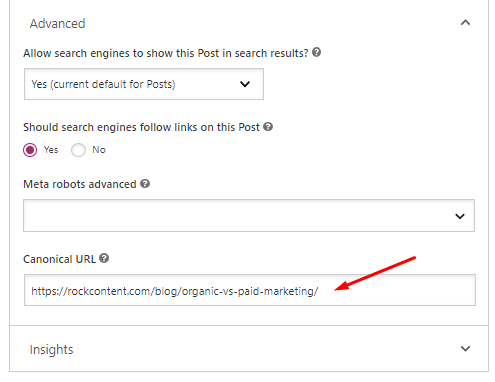
In the code, this tag looks something like this:
<link rel=”canonical” href=”https://www.yourwebsite.com/page/” />.
The page this tag is on is not the canonical URL, it points to the canonical URL indicated after “href.”
If you’re dealing with non-HTML documents like PDFs, you can set the rel=”canonical” tag in the HTTP header using your site’s .htaccess file.
A correctly implemented tag looks like this:
Link: <http://www.yourwebsite.com/documents/filename.pdf>; rel=”canonical”
301 redirects
301 redirect can help you specify canonical URLs for cases like HTTP and HTTPS versions of a page, non-WWW and WWW versions, or trailing-slash and non-trailing slash URLs. Google assumes all URLs in a site map to be canonical, so carefully structure your site map.
For best practices:
- Combine various methods to specify a canonical URL to get better results.
- Specify only one canonical URL per page using absolute URLs, not relative ones.
- Pay attention to the correct domain protocol, trailing slash usage, and WWW usage.
Pro tip: Identify the most user-friendly URL, such as http://www.yourwebsite.com/documents/filename.pdf, to be the canonical one.
It’s crucial not to block Google from crawling specific URLs or deleting non-canonical versions without proper redirection. These actions can lead to lost ranking signals or broken links.
For more detailed information, you can check out our guide on how to edit your canonical URL or explore when to use rel canonical or noindex tags.
Common Issues and Troubleshooting
Canonical URLs can be a valuable tool for your SEO strategy, but they come with potential pitfalls that require your attention.
To effectively address these issues, it is crucial to regularly audit your site’s canonical tags. Here are four common issues related to canonical URLs and their troubleshooting solutions:
Missing canonical tags on accelerated mobile pages (AMP)
Pages Accelerated Mobile Pages (AMP) are designed to provide faster-loading mobile web pages. However, if your website includes AMP pages without corresponding canonical tags, it can lead to indexing and ranking issues.
To resolve this problem, review your AMP pages and ensure that each page has a specified canonical tag. Add the appropriate canonical tag to each AMP page’s HTML header, indicating the preferred URL for search engines to index and rank.
This establishes the correct relationship between the AMP version and the canonical version of your content, improving SEO performance.
Duplicate content without canonical tags
Duplicate content refers to identical or substantially similar content that appears on multiple pages within your website. When duplicate content exists without proper canonical tags, it can confuse search engines and impact your website’s SEO.
To troubleshoot this issue, conduct a comprehensive content audit and identify all instances of duplicate content. Once identified, specify canonical URLs for each page with duplicated content.
Ensure that each duplicate page has a canonical tag pointing to the preferred or master version of the content. This helps search engines understand which page should be indexed and ranked, consolidating signals and avoiding duplicate content penalties.
Pages with multiple canonical URLs
Having pages with multiple canonical URLs can create confusion for search engines and affect your SEO efforts. If you encounter pages with multiple canonical URLs, it is crucial to address this issue promptly.
Review the affected pages and ensure that only one canonical URL is specified per page. Check for any misconfigurations or errors in the implementation of canonical tags. Use absolute URLs instead of relative ones to provide clear and unambiguous information to search engines.
By specifying a single canonical URL for each page, you guide search engines in properly indexing and ranking the page, enhancing your website’s overall SEO performance.
Broken canonical tags
Broken canonical tags occur when the specified canonical URL is inaccessible or no longer valid. This can happen due to changes in site structure, URL modifications, or improper implementation.
It is important to identify and rectify broken canonical tags promptly to avoid negative SEO consequences. Conduct a comprehensive audit of your website’s canonical tags and check the status of each canonical URL.
If any canonical URL is broken or leads to an error page, update it with the correct and functioning URL. This ensures that search engines accurately interpret the canonical tag and correctly index and rank your pages.
By actively troubleshooting and addressing these common issues, you can optimize your website’s SEO, ensure accurate indexing and ranking of your pages, and contribute to the overall success of your online presence.
Improving Your SEO With Canonical URLs
Canonical URLs help you fix duplicate content issues, enable search engines to understand your site better, and improve your site’s visibility. Recognizing and using them demonstrates your commitment to your website’s success.

